
- Expertise:
- Platform Testing, Cryptocurrency, Retail Investing
- Credentials:
- Active investor since 2013 · 11+ years experience
- Tested:
- 50+ platforms · 200+ guides authored

- Expertise:
- Broker Comparison, ISA Strategy, Portfolio Management
- Credentials:
- Active investor since 2013 · 11+ years experience
- Tested:
- 40+ brokers with funded accounts
How We Test
Real accounts. Real money. Real trades. No demo accounts or press releases.
What we measure:
- Spreads vs advertised rates
- Execution speed and slippage
- Hidden fees (overnight, withdrawal, conversion)
- Actual withdrawal times
Scoring:
Fees (25%) · Platform (20%) · Assets (15%) · Mobile (15%) · Tools (10%) · Support (10%) · Regulation (5%)
Testing team:
Adam Woodhead (investing since 2013), Thomas Drury (Chartered ACII, 2018), Dom Farnell (investing since 2013) — 50+ platforms with funded accounts
Quarterly reviews · Corrections: [email protected]
Disclaimer
Not financial advice. Educational content only. We're not FCA authorised. Consult a qualified advisor before investing.
Capital at risk. Investments can fall. Past performance doesn't guarantee future results.
CFD warning. 67-84% of retail accounts lose money trading CFDs. High risk due to leverage.
Contact: [email protected]
Quick Answer: How Do You Buy Cryptocurrency in Australia?
Getting started with cryptocurrency in Australia is simpler than you might think.
- Create an account with a crypto exchange like Pepperstone Crypto or Coinbase.
- Verify your identity and deposit AUD into your account.
- Research cryptocurrencies such as Bitcoin or Ethereum.
- Purchase crypto via the exchange's app or website.
- Use a crypto wallet for secure storage or keep it on the exchange.
 Spot Crypto Exchange
Digital Assets are highly volatile. You may lose some or all of your investment. Please ensure you understand and accept the risks.
Introduction
When I first began exploring cryptocurrency, I was overwhelmed by the countless options and the seemingly complex process. However, after some research and trial and error, I found a straightforward way to get started. This guide is designed to help Australians confidently navigate the world of crypto in 2026, offering clear steps, personal insights, and practical tips to make your journey as smooth as possible.
To Buy Cryptocurrency in Australia, Here's What You Need to Do:
- Choose a trusted exchange: Look for a platform designed for Australian users that supports AUD for smooth and cost-effective transactions.
- Sign up for an account: Create an account with your email and basic details—it's quick and easy to get started.
- Verify your identity: Upload your ID and proof of address to meet Australia's KYC requirements and secure your account.
- Fund your account: Deposit AUD using PayID, BPAY, or a direct bank transfer—whichever is most convenient for you.
- Buy your cryptocurrency: Select the coin you want to invest in, enter the amount, and confirm your purchase.
- Secure your assets: Transfer your crypto to a private wallet to keep your investment safe from potential risks.
Step 1: Choose the Right Platform
Selecting the right cost effective exchange was the first step in my Crypto journey. There are plenty of options, but finding one that suits Australians requires considering fees, AUD compatibility, and ease of use.
Key factors I considered:
- Regulation: Platforms regulated under AUSTRAC are safer and more reliable.
- AUD support: Avoid currency conversion fees by using exchanges that directly support AUD.
- Fees: Low trading and deposit fees make a big difference for small investors like me.
How to Choose the Best Exchange for Australians
Here's what I looked for when choosing an exchange:
- AUD integration: Using AUD for deposits saves on currency conversion.
- Security: Look for exchanges offering 2FA and insurance against breaches.
- Ease of registration: Platforms like Pepperstone Crypto, eToro, and Coinbase simplified the onboarding process.
Pro tip: Check Australian forums or reviews for insights into local user experiences.
Below, I'll discuss three standout platforms for Australians, but you can find a more comprehensive comparison of these exchanges here: Best Crypto Exchanges for Australians .
| Feature | Pepperstone Crypto | eToro | Kraken | Coinbase |
|---|---|---|---|---|
| Ease of Use | Clean interface with Convert mode for beginners and 7 order types for experienced traders. | User-friendly, ideal for beginners with CopyTrading features. | Advanced interface, best for experienced traders. | Extremely user-friendly, great for first-time buyers. |
| Fees | Flat 0.1% maker/taker — the simplest and lowest fee structure on this list. | Medium fees; includes spread and withdrawal costs. | Low fees; 0.16% maker, 0.26% taker. | High fees; 1.49% transaction fee plus spread, extra for debit/credit cards. |
| Funding Options | OSKO/NPP bank transfer (free, near-instant). | PayID, POLi, credit/debit cards, bank transfers. | Bank transfer, crypto deposits, wire transfer. | Bank transfer, debit/credit card, PayPal. |
| Crypto Selection | 12 cryptocurrencies (BTC, ETH, SOL, BNB, LINK, LTC, AAVE, RENDER, HYPE, XAUT, USDT, USDC). | 70+ cryptocurrencies, focuses on popular assets. | 200+ cryptocurrencies, including niche options. | 250+ cryptocurrencies, with a focus on variety and education. |
| Security | AUSTRAC registered, Pepperstone Group backing (est. 2010), Proof of Reserves. | 2FA, cold storage, regulated by global financial authorities. | 2FA, cold storage, SSL encryption. | 2FA, biometric logins, AES-256 encryption. |
| Regulatory Compliance | AUSTRAC registered (100889269), backed by Pepperstone Group with ASIC, FCA, CySEC licences. | Regulated under ASIC and other global financial authorities. | Complies with global standards, including AUSTRAC. | Registered as a Money Services Business and AUSTRAC compliant. |
When I began exploring exchanges, Pepperstone Crypto's flat 0.1% fee caught my attention — no hidden spreads, no tiered complexity. For serious trades, Kraken Pro stands out for advanced charting, while Coinbase remains my go-to for quick transactions. eToro's CopyTrading is also useful for learning from experienced traders.
Step 2: Register and Verify Your Identity
Setting up an account on Pepperstone Crypto was straightforward, though it required identity verification. Australian exchanges must comply with KYC (Know Your Customer) regulations, which protect against fraud and ensure the platform meets AUSTRAC standards.
How to Register and Verify on Pepperstone Crypto
Signing up on Pepperstone Crypto involved visiting pcrypto.com, entering my email address, choosing a strong password, and enabling two-factor authentication (2FA) for security. The whole process was clean and intuitive — Pepperstone's interface made it easy to move through each step without confusion.
Steps to register:
- Visit pcrypto.com and click "Sign Up."
- Enter your email and create a secure password.
- Verify your email and enable 2FA.
- Complete the KYC verification by uploading your ID.
Pepperstone Crypto guided me through the entire process seamlessly, and I was verified faster than I expected.
Registration Process Explained
I uploaded my driver's licence and a recent utility bill to verify my identity and address. Pepperstone Crypto's KYC process was notably fast — my verification was completed within hours rather than the 24–48 hours I'd experienced on other platforms.
Tips for a smoother process:
- Ensure your documents are clear and legible.
- Double-check your details before submitting.
KYC Verification and Its Importance in Australia
While KYC felt like a hassle at first, it's a vital step. It ensures compliance with Australian laws and adds a layer of security.
Why KYC matters:
- Protects against fraud and scams.
- Ensures exchanges comply with AUSTRAC regulations.
- Adds trust and security to the platform.
This process not only safeguards your account from unauthorised access but also ensures compliance with AUSTRAC and Australian regulatory standards, giving you peace of mind as you begin trading cryptocurrencies like BTC, ETH, or SOL.
Step 3: Deposit Funds into Your Account
Transferring Funds Into Your Pepperstone Crypto Account
After completing verification, I needed to deposit AUD into my Pepperstone Crypto account. The platform supports OSKO/NPP bank transfers, which are free and arrive near-instantly — a significant advantage over platforms that charge deposit fees or take days to process transfers.
Before making a deposit, double-check the payment details provided by Pepperstone Crypto to avoid any errors or delays. The platform's clean interface guides you through the funding process from start to finish.
I used an OSKO/NPP transfer from my Australian bank account, and my funds appeared in my Pepperstone Crypto account within minutes. No fees, no waiting — exactly what you want when you're ready to start building a diversified crypto portfolio.
Steps to fund your account:
- Log in to Pepperstone Crypto and navigate to the "Deposit" section.
- Select OSKO/NPP bank transfer as your payment method.
- Use your banking app to send the funds to the provided account details.
- Your AUD balance will update near-instantly, ready for trading.
What Payment Options Are Available in Australia?
| Payment Method | Speed | Fees | Best For |
|---|---|---|---|
| PayID | Instant | Free | Small, quick deposits |
| BPAY | 1–2 days | Low | Large transactions |
| POLi | Instant | Low | Bank-linked payments |
| Bank Transfer | 1–3 days | Low | High-value transactions |
| Credit/Debit Card | Instant | High | Immediate purchases |
Each payment method has its strengths. For small, quick deposits, I always rely on PayID. It's fast, reliable, and often free. However, for transferring larger sums, I prefer BPAY. Although it takes a little longer, it's trusted and widely accepted by exchanges.
Step 4: Placing Your First Crypto Order
Once your wallet is funded, purchasing cryptocurrency becomes a straightforward task. Locate the cryptocurrency you want to buy on the platform, input the desired amount, and finalise the transaction. I vividly remember my first purchase—it felt like a big leap, and I meticulously reviewed every detail before pressing "Buy," knowing it marked the beginning of my crypto journey.
How Do You Place a Buy Order on Pepperstone Crypto?
Pepperstone Crypto offers two ways to buy: Convert mode for beginners and Spot trading for more experienced traders. Convert mode lets you simply swap AUD for crypto in a few clicks, while Spot trading gives you access to 7 order types including trailing stops for precise execution.
- Choose your cryptocurrency: Select from 12 cryptocurrencies including BTC, ETH, SOL, BNB, LINK, LTC, AAVE, RENDER, HYPE, XAUT, USDT, and USDC. For your first purchase, consider starting with a mix — perhaps some Bitcoin for stability and some Ethereum for smart contract exposure.
- Enter the amount: Specify how much AUD you want to invest.
- Select your trading mode:
- Convert mode (beginners): Simply enter an amount and convert — no charts or order books required.
- Spot trading (advanced): Choose from market orders, limit orders, stop-limit orders, trailing stops, and more.
- Review and confirm: Double-check all details before confirming your order.
My first purchase on Pepperstone Crypto took less than 5 minutes using Convert mode. I started by picking up some BTC and ETH to diversify from day one rather than going all-in on a single asset. The flat 0.1% fee meant I knew exactly what I was paying — no hidden spreads eating into my investment. Once completed, your crypto holdings appear in your Pepperstone Crypto portfolio, ready to be managed or transferred to a private wallet.
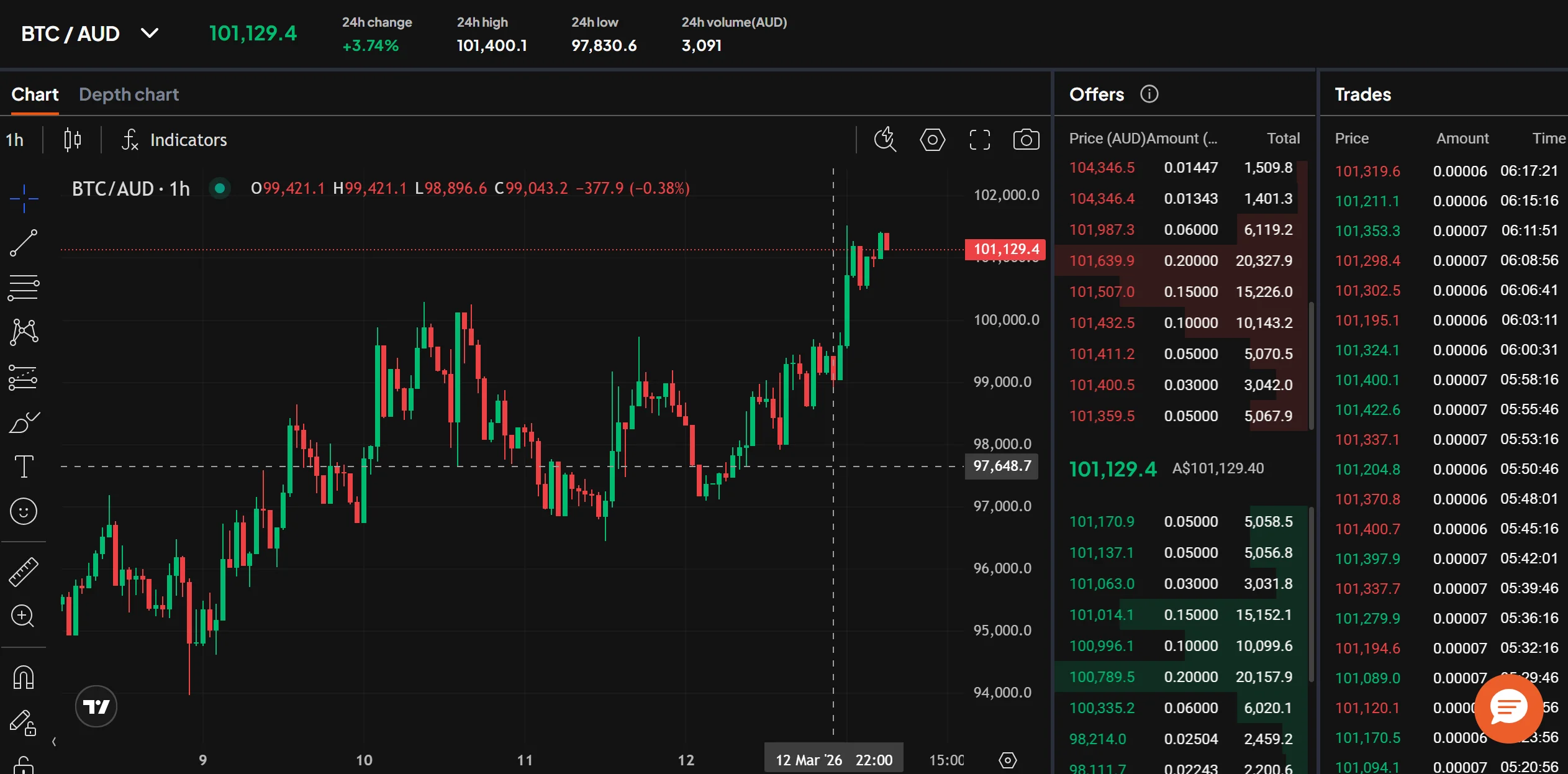
Market vs. Limit Orders – What's the Difference?
When I placed my first Crypto order, I was unsure whether to use a market order or a limit order. Here's how I learned the difference:
- Market Order:
- Executes instantly at the current market price.
- Best for beginners or when you want to buy or sell quickly without waiting.
- Example: I used a market order to buy Bitcoin immediately during a price dip, ensuring I didn't miss out.
- Downside: You might pay slightly more due to price slippage during high market activity.
- Limit Order:
- Executes only when your selected cryptocurrency reaches the specific price you set.
- Best for advanced users who want precise control over their trades.
- Example: I set a limit order to purchase Bitcoin at $40,000 AUD when the market price was $41,000 AUD. This would allow me to purchase at a lower price automatically once the market dropped to my target level.
- Opt for limit orders if you're willing to wait for a better deal.
Step 5: Storing your Crypto Investment Safely
After trading my first cryptocurrency, I quickly realised that securing it is just as crucial as making the purchase. Proper storage is essential, and a robust security plan should always be at the top of your priorities.
Should You Store Your Crypto on an Exchange or in a Wallet?
Storing your Crypto on an exchange offers convenience, especially for frequent traders, but it comes with risks like potential hacks or platform failures. In contrast, a private wallet provides greater security and full control of your assets, protecting them from external threats.
Personally, I keep a small portion of my crypto on exchanges for quick trades but store the bulk in a hardware wallet for maximum security.
What Are the Pros and Cons of Keeping Crypto on an Exchange?
Keeping Crypto on an Exchange
Pros:
- Convenience: Easy access for frequent trading.
- Ease of Use: No need to manage private keys.
Cons:
- Security: Vulnerable to hacks and outages.
- Control: No full control as the exchange holds your keys.
Using a Private Wallet
Pros:
- Security: Provides full control and ownership of your assets.
- Risk Mitigation: Enhanced security, reducing risks of hacks or exchange failures.
Cons:
- Know-how: Requires setup and understanding of wallet usage.
- Convenience:
- Less convenient for regular trading due to additional steps for deposits and withdrawals.
The choice depends on your needs. If you're actively trading, an exchange might be more practical. For long-term storage and higher security, a private wallet is the better option.
How Do You Transfer Crypto to a Private Wallet?
Set Up Your Wallet:
- Hardware wallets (e.g., Ledger Nano X, Trezor Model T) for long-term security.
- Software wallets (e.g., Trust Wallet, Exodus) for active trading.
- Follow the wallet's setup instructions: Create your account and securely store backup information, such as private keys or recovery phrases.
- Backup your private keys: Store backups in multiple secure locations to ensure access if the wallet is lost or damaged.
Initiate the Transfer from Pepperstone Crypto:
- Log in to your Pepperstone Crypto account and navigate to your specified Crypto balance.
- Click on "Withdraw" and select Bitcoin (BTC) as the cryptocurrency to transfer.
Enter Your Wallet's Public Address:
- Copy your wallet's public address (ensure it matches the cryptocurrency type, e.g., BTC for Bitcoin).
- Paste the address into the designated withdrawal field on Pepperstone Crypto.
- Double-check the address carefully—any mistake can result in a permanent loss of funds.
- Specify the amount of crypto assets you wish to transfer.
Authorise and Confirm the Transaction:
- Complete any additional security verifications required by Pepperstone Crypto (e.g., two-factor authentication).
- Confirm the transaction to initiate the transfer.
- Your Crypto will arrive in your wallet once the blockchain processes the transaction, which may take a few minutes to an hour.
By moving your assets to a private wallet, you gain full control over your digital assets and reduce the risk of losing them to exchange breaches or online attacks. For me, the peace of mind from using a hardware wallet far outweighs the initial setup effort.
Best Crypto Wallets for Australian Traders
| Wallet | Type | Features | Security Level | Price (AUD) |
|---|---|---|---|---|
| Ledger Nano X | Hardware | Offline storage, Bluetooth-enabled | Very High | $239 AUD |
| Trezor Model T | Hardware | Easy setup, touchscreen interface | Very High | $299 AUD |
| Trust Wallet | Software | Mobile-friendly, supports multi-crypto | Medium | Free |
| Exodus Wallet | Software | Desktop/mobile compatibility, staking options | Medium | Free |
I personally use the Ledger Nano X—it feels reassuring to know my Crypto assets are stored offline. For those who prefer simplicity, Trezor is an excellent choice.
Check out our guide for an in-depth look at wallet options tailored for Australians. Explore the Best Wallets for Australians
Tip: Always double-check the wallet address to avoid irreversible mistakes.
Step 6: Tracking and Managing Your Crypto Investment
After securing my crypto across multiple assets, I wanted to keep track of how each one was performing. When you hold a diversified portfolio — say BTC, ETH, and SOL — tracking becomes even more important because each asset moves independently.
Tools for Tracking a Diversified Portfolio
I use a combination of Pepperstone Crypto's built-in dashboard and external apps to monitor my holdings. Having everything in one view helps me understand how my overall portfolio is performing, not just individual coins.
Features to look for:
- Multi-asset portfolio overviews showing allocation percentages.
- Customisable price alerts for each cryptocurrency.
- Real-time price updates across all your holdings.
Tracking your crypto investments is essential to stay informed about market movements across different assets. When you're holding Bitcoin for stability, Ethereum for smart contract exposure, and Solana for speed — each responds differently to market events. Portfolio management tools make it easy to see the bigger picture.
Portfolio Dashboards
Pepperstone Crypto provides a clean portfolio dashboard that shows your holdings across all supported cryptocurrencies. Key features include:
- Asset Distribution: View how your investments are spread across your supported cryptocurrencies — including BTC, ETH, SOL, BNB, LINK, AAVE, and the rest of the 12-coin lineup — at a glance.
- Real-Time Balances: See the current AUD value of each crypto holding updated in real time.
- Trade History: Review your past trades to track performance and refine your strategy over time.
For me, seeing my diversified portfolio in one dashboard has been invaluable. It helped me notice when one asset was outperforming others, prompting me to rebalance my holdings.
Price Alerts
Setting up price alerts is essential when you're tracking multiple cryptocurrencies. Here's how alerts help with a diversified portfolio:
- React Quickly: Be notified when any of your holdings — BTC, ETH, or SOL — hit your target prices.
- Volatility Management: Stay ahead of sudden market changes across different crypto sectors.
- Rebalancing Triggers: Use alerts to know when it's time to shift allocation between assets.
Best tools for price alerts:
- CoinGecko (supports watchlists across hundreds of tokens).
- CoinMarketCap (detailed alerts with volume and market cap data).
- Crypto Pro (advanced analytics with portfolio-level notifications).
Market News and Insights
Staying informed is critical when you're invested across multiple crypto sectors. Different news impacts different assets — Ethereum upgrades affect ETH, Solana ecosystem growth affects SOL, and macroeconomic events tend to move Bitcoin first. I keep up with:
- Market Updates: Regular insights into crypto trends, Australian regulatory changes, and global market movements.
- Sector-Specific News: DeFi developments for ETH, network upgrades for SOL, and stablecoin regulatory news for USDT/USDC.
Additional Tools for Tracking
For a broader market perspective, I use external tools to complement Pepperstone Crypto's dashboard:
- CoinGecko: Tracks live prices, market caps, and token rankings across hundreds of cryptocurrencies — great for researching assets beyond what Pepperstone offers.
- CoinMarketCap: Offers detailed trading volumes, charts, and insights for market analysis.
- Crypto Pro: A portfolio tracker with advanced analytics, price alerts, and news aggregation — perfect for consolidating data from multiple sources.
Combining Pepperstone Crypto's built-in tools with external platforms like CoinGecko and Crypto Pro provides a comprehensive view of the market. These resources make it easier to track how different cryptocurrencies perform relative to each other, helping you make informed decisions about portfolio allocation and rebalancing.
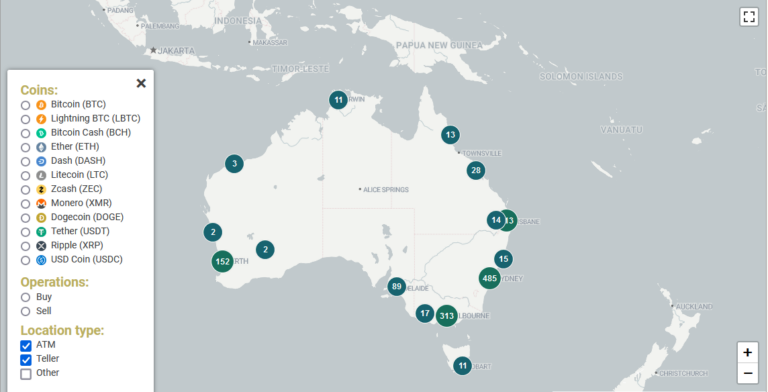
How Can Crypto ATMs Be Used Alongside Exchanges in Australia?
Crypto ATMs are convenient for Australians who prefer quick, in-person transactions. Located in major cities, these ATMs allow you to buy or sell cryptocurrencies — including Bitcoin, Ethereum, and other popular altcoins — using cash or bank cards.
Benefits of Crypto ATMs:
- Accessibility: No need for an exchange account.
- Speed: Transactions are processed instantly.
- Privacy: Minimal personal details required for smaller transactions.
However, CryptoATMs often charge higher fees than exchanges. I recommend them for emergencies or small purchases. According to Statista, there are over 200 Bitcoin ATMs in Australia as of 2025.
What Mistakes Should Australians Avoid When Buying Crypto?
As a beginner, I made some costly mistakes. Here are the most common errors Australians should avoid:
- FOMO buying: Jumping in during price spikes can lead to losses.
- Ignoring fees: Always check for deposit, withdrawal, and trading fees.
- Using unsecured wallets: Prioritise security to prevent hacks.
Real-life example: I once forgot to enable 2FA on an exchange, which left my account vulnerable. It's a mistake I'll never make again.
What Should You Know About Crypto Before You Buy?
How Do Cryptocurrencies Work?
Cryptocurrency is a digital form of money powered by blockchain technology. Unlike traditional currencies, it operates on a decentralised network of computers (nodes) to ensure security, transparency, and trust—eliminating the need for banks or central authorities.
Key Features of Cryptocurrency:
- Decentralised Network: Cryptocurrencies rely on a global network of nodes to verify and record transactions, removing intermediaries.
- Blockchain Ledger: Each transaction is permanently recorded on a blockchain, a public and tamper-proof ledger that ensures transparency.
- Efficiency: Transactions are often faster and more cost-effective, particularly for cross-border payments.
- Diverse Applications: Cryptocurrencies range from Bitcoin as a digital currency to Ethereum, which supports smart contracts, and many others with unique use cases.
What Are the Final Steps to Start Investing in Crypto?
Starting your crypto journey is simple:
- Start small: Buy a manageable amount to learn how the market works.
- Secure your Crypto Assets: Transfer it to a trusted wallet.
- Educate yourself: Stay informed about the market and investment strategies.
Platforms like Pepperstone Crypto, eToro, or Coinbase are great starting points for Australians. When I began, I made small, calculated moves and gradually gained confidence. Taking that first step is the hardest but most rewarding part.
Your capital is at risk.
Frequently Asked Questions
What cryptocurrency should a beginner buy first in Australia?
Most beginners start with Bitcoin (BTC) or Ethereum (ETH) as they're the most established and widely supported cryptocurrencies. Bitcoin serves as a digital store of value, while Ethereum powers smart contracts and decentralised applications. Pepperstone Crypto offers both alongside 10 other cryptocurrencies — SOL, BNB, LINK, LTC, AAVE, RENDER, HYPE, XAUT, USDT, and USDC — a solid curated selection covering majors, DeFi, infrastructure, stablecoins, and gold-backed tokens.
How do I diversify my crypto portfolio?
Diversification means spreading your investment across different cryptocurrencies rather than putting everything into one coin. A balanced approach might include Bitcoin for stability, Ethereum for smart contract exposure, and Solana for high-speed blockchain technology. Start with small allocations and adjust as you learn more about each asset's role in the broader crypto ecosystem.
What's the difference between Bitcoin and Ethereum?
Bitcoin was created as a decentralised digital currency — a peer-to-peer payment system and store of value. Ethereum is a programmable blockchain that supports smart contracts and decentralised applications (dApps). While Bitcoin focuses on being digital money, Ethereum powers an entire ecosystem of DeFi protocols, NFTs, and Web3 applications.
What are stablecoins and why would I use them?
Stablecoins like USDT and USDC are cryptocurrencies pegged to the US dollar, maintaining a roughly 1:1 value. They're useful for parking funds during volatile markets without converting back to AUD, moving money between exchanges quickly, and as a stepping stone into other crypto assets. Pepperstone Crypto supports both USDT and USDC trading.
Is cryptocurrency regulated in Australia?
Yes. Cryptocurrency exchanges operating in Australia must register with AUSTRAC and comply with anti-money laundering (AML) and counter-terrorism financing (CTF) regulations. The Australian government treats cryptocurrency as property for tax purposes. Always use an AUSTRAC-registered exchange to ensure your funds are protected under Australian regulatory standards.
References
Digital Assets are highly volatile. You may lose some or all of your investment. Please ensure you understand and accept the risks.